Your 8‑bar loop
has a 0day.
AILive is a free AI producer that patches straight into Ableton Live, and now works natively in Logic Pro. It turns your loop into a finished, mixed and mastered track inside your own project, built from your own sounds.
Windows: unsigned setup preview. Native New track, Finish and export are not available.
$0.00 macOS 14+ · Apple silicon · 141 MB · notarized · no account · no subscription
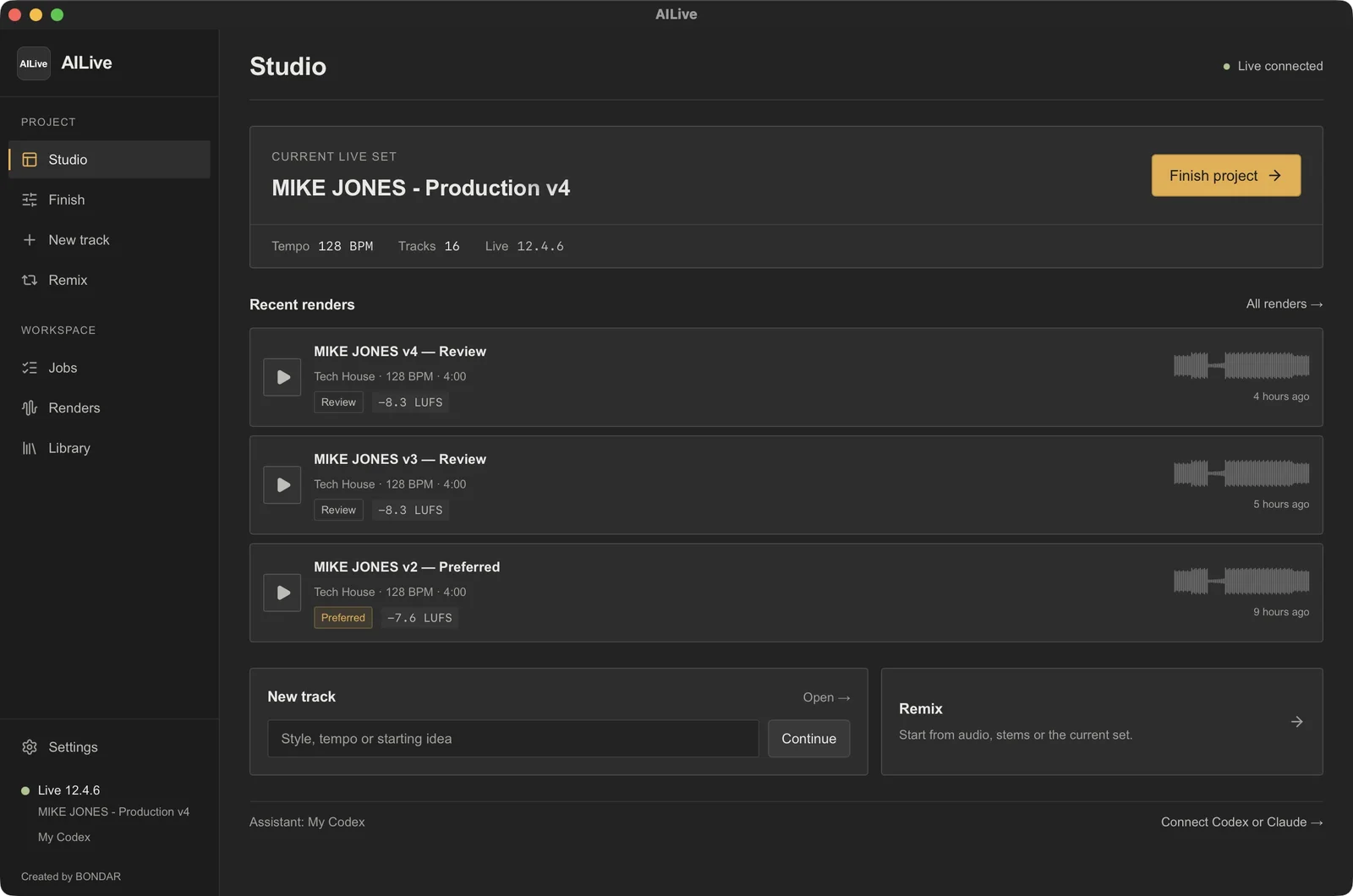
Built around one strong centerpiece.
Every job starts from the idea worth hearing (a hook, a vocal, a groove) and builds the track around it. Nothing gets stacked on filler.
Finish
Bring a loop or a stalled project. Name the centerpiece and what to keep. AILive arranges, mixes and masters, then logs what it changed.
New track
Type a vibe. It builds from real loops, kits and presets in your library.
Remix
Start from audio, stems or the open set. Split a clip into stems inside Live.
Every pass is a render
Real audio with a loudness reading. Play it, A/B it, keep the one you love.
Notes, not knobs
Tap a quick fix or pin a note to the exact moment. Only what you mention changes.
Bring your own brain
Use the assistant you already have. Keys stay in your Mac’s Keychain.
Completely free. No catch.
- [x] No price, no account, no subscription, no license key.
- [x] Runs on your Mac. Your sets, samples and renders stay local.
- [x] Bring your own AI: the Codex or Claude you already have.
From download to drop in four steps.
- 01
Install
Free installer, notarized by Apple. Run Install AILive: the app, engine and Live bridge go in one pass.
- 02
Patch into Live
Restart Live, open Settings › Link, Tempo & MIDI and pick AIBLETON (the AILive bridge) as a Control Surface. On Logic Pro? Skip this: open the Logic Pro page and choose Check Logic.
- 03
Pick a brain
Allow AILive in Privacy & Security › Accessibility, then use the Codex or Claude Code you already have, or your own API key.
- 04
Ship the track
Point it at your sample folders, open a copy of a set, hit Finish, and listen.
man ailive
- mac
- Apple silicon · macOS 14+
- win
- Windows 11 · x64 · unsigned setup preview
- live
- Ableton Live 12 · tested on 12.4.6 Suite
- logic
- Logic Pro 11 · tested on 11.0.1
- ai
- Codex, Claude Code or an API key
- price
- $0.00
> is it really free?
Yes. No price, no account, no subscription, no license key. Download it and keep it. If you plug in your own OpenAI or Anthropic API key, that provider bills your usage; AILive itself costs nothing.
> what do I need?
An Apple silicon Mac on macOS 14 or later, plus Ableton Live 12 (tested on 12.4.6 Suite; splitting stems needs Live 12.3+ Suite) or Logic Pro 11 (tested on 11.0.1). Bring your own samples and plugins.
> which AI does it run on?
Yours. Choose My Codex, My Claude Code, or an OpenAI or Claude API key in Settings. Keys are stored in your Mac’s Keychain.
> logic pro?
Yes, natively, no Ableton needed. Make it in Logic builds a track around one centerpiece from your samples and delivers a real Logic project: aligned audio tracks, tempo and section markers, plus the mastered version on a muted track for A/B. AILive saves it, reopens it and bounces it to check the result. Finish a copy in Logic copies your .logicx first and never touches the original. Parts arrive as audio; Logic instruments and plug-ins are not created.
> will it wreck my project?
AILive works on a copy of your set, keeps your existing parts, and logs every change. It’s early access, so back up anything you care about.
> windows?
Windows 11 (x64) has an unsigned setup preview. This update fixes setup, Live bridge installation, settings and library scans. Native UI interaction is not yet verified. Native New track, Finish and export are not available on Windows. Requires Microsoft WebView2 Evergreen. Windows may show an unknown-publisher or SmartScreen warning because this preview is not code-signed.
Make the track you hear in your head.
macOS 14+ · Apple silicon · 141 MB installer · notarized by Apple
Download for Macsha256 checksum
e49f99a95acb8f418e9e3624ed313bc55579907a3c5c89cda272fc261e54352eWindows 11 · x64 · 137 MB installer · unsigned preview
sha256 checksum
3e67b2a9214650131b54c50ad7604411b33ebe18ae875669380d5c7f1cc91887Early access: always work on a copy of your project. AI usage through your own API key is billed by your provider.